
I Tried MapQuest's New Surveillance Tracking Feature. Good Idea, But The App Keeps Crashing
Good route planning on a motorcycle is essential, no matter where you're going. MapQuest offers a new Surveillance layer, but is the app actually usable?

Listen, as a person just existing in the world in 2026, I know that I, any vehicle I'm riding on or in, and pretty much everything I do outside my front door, is very often being captured on some type of camera.
Whether you're walking down the street, or you're in a grocery store (and especially if you're in an airport), you and I are being watched. From Ring doorbells to Meta glasses, from the almost quaint-seeming security cams on businesses to the dystopian Amazon and USPS delivery truck (and driver) cameras that are coming soon, we are pretty much all camgirls whether we like it or not.
Now, I'm old enough that I used to rely on printouts from MapQuest back in the day to get places. But of course, like most other folks living in our modern age, that eventually morphed into using Google Maps and/or Waze on my phone to get around, because I'm an Android user. If you're an iOS person, then I'm sure you could say the same about Apple Maps. In either case, even if you ever used MapQuest in the past, chances are excellent that you probably haven't spent much time thinking about that particular navigation provider for a pretty significant amount of time.
That is, until recently. If you, like me, thought that MapQuest was yet another old-Internet thing that had gone the way of the dodo, the company would kindly ask you to think again. In our extremely divided world right now, what's one thing that's bringing people of all kinds of backgrounds and beliefs together?
That's right: Dislike, distrust, and in some cases full-on hatred of Flock (and Axon) automated license plate readers (ALPRs). And for plenty of good reasons, which I won't rehash here. What I will say is that makes MapQuest's latest move to re-enter the public consciousness all the more important and enticing.
Last week, the folks at MapQuest officially announced that they'd added a brand-new Surveillance layer to the available options you can use when searching for directions. It's available in the latest version of both the Android and the iOS apps, and I've been using the Android one ever since I found out about it.
One very cool thing about the MapQuest app is that it does not require you to log in to pull up directions to anywhere. Obviously, you do have to enable Location on your phone; that's kind of the basis upon which all navigation apps operate. Your phone is, of course, still identifiable as it pings cell towers wherever you're traveling, so no one should mistake this for complete anonymity. In our digital device-laden age, that's incredibly difficult to come by.
Still, one less login is one less login, and one less company that insists on aggregating your data and selling it to the highest bidder is one less company doing that thing that drives most reasonable people at least a little bit insane. You can even choose a cute little 8-bit-looking avatar of your choice to represent you as MapQuest navigates you toward your chosen destination. There's a sparkly 8-bit unicorn, a ghost, and a few other things to choose from, all with no login required. Cute!
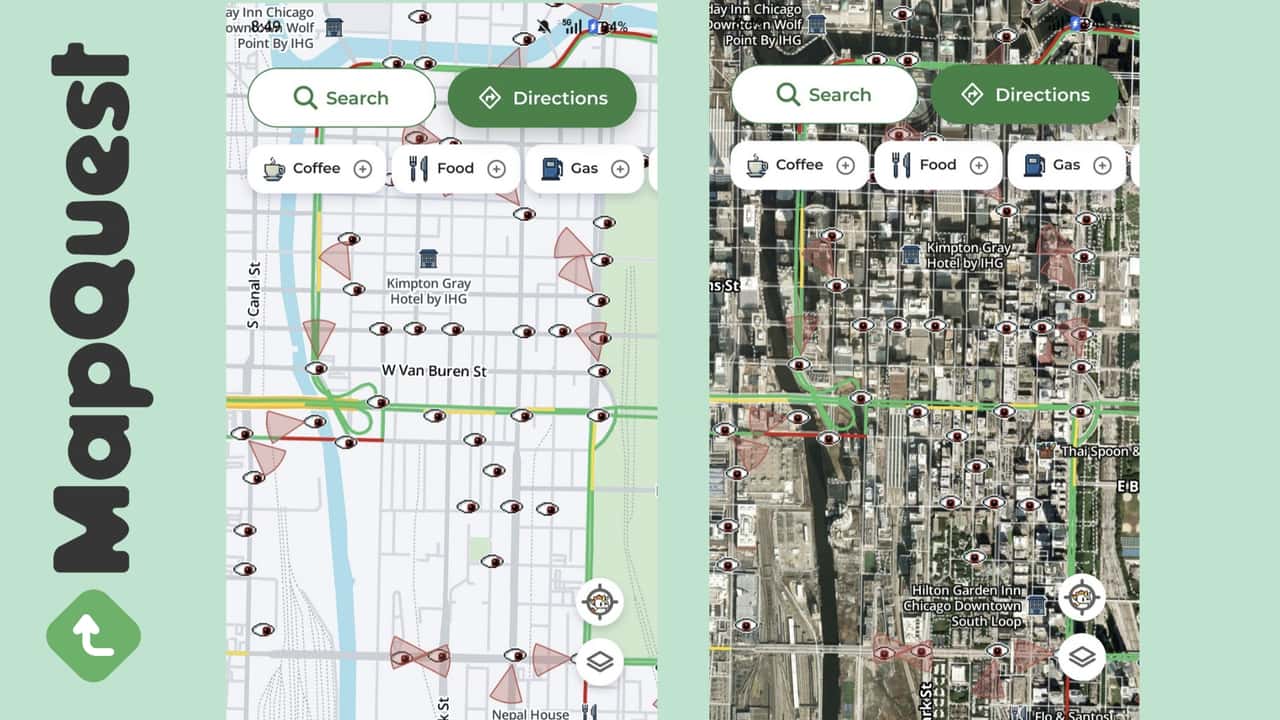
You can engage the Surveillance layer on either the Default view or the Satellite view, but it's a lot more difficult to parse if you choose the Satellite view. See the image up above, which features screenshots of the same area of downtown Chicago side-by-side in both views for comparison. On the Default view, which is on the left, all the surveillance cameras are indicated by eyes that are animated and move creepily from side to side if you're looking at the app on your phone.
As you can also see, directionality of the cameras is indicated in MapQuest's Surveillance layer. You can visually see the red cones emanating out in one direction or another from the eyeball on the map. While clicking on an individual camera on the map will get you some more information about it, the layer doesn't identify whether it's Flock, Axon, or any other provider. What it does do is tell you, to the degree, what the directionality of that camera is. It's a neat feature, and animating the eyeballs balances the general unease of a surveillance state with the kind of dark humor that many of us rely on to get through, uh, Situations.
Always For Sale
There's Just One Problem
All of this sounds great, right? I thought so, too; there are many reasons to not want all of your data in the hands of Google, Apple, or any major tech giant, for that matter. The appeal of a navigation system that isn't operated by one of the major players should, in our current environment, be pretty self-evident.
Except ... while I can only speak for the Android version (I haven't used the iOS one, after all), my biggest problem with it is that it's completely unreliable. I've tried to use it to navigate places both in a car and on a motorcycle. In the car, I used it to go to a place that I know very well, and can easily navigate to without using any directions; it's just in my head.
MapQuest tried to take me several blocks away, to what ended up being a car dealership and not the grocery store I was trying to visit. Frustrated, I shut it off and put my phone in my pocket as I did my shopping. I was so frustrated that I deleted it off my phone entirely after that.
Still, I wanted to try again, especially with the added appeal of the surveillance layer. While there have been sites like Deflock that can show you where the cameras are in your area for some time, having a functional navigation app with a surveillance layer built in seems like a really great feature, you know?
So I reinstalled MapQuest on my Android phone, punched in where I wanted to go, had Bluetooth going to my comms unit in my motorcycle helmet, and set off. At first, things were fine. The MapQuest lady's voice was a little lower in the mix against my music than I would've liked, but I could still hear her.
Until I couldn't, because the app crashed. I found a side street and pulled over to see why she wasn't giving me directions anymore, which is when I found this out. I then asked Google Maps to get me to the same place, because at least I knew Google Maps wouldn't crash on me and should reliably get me to my destination. And I thought that would be the end of that.
Boy, was I wrong.
An In-Helmet Navigation Battle For The Ages
At first, the Google Maps lady was spouting directions into my ears at her normal level; quite audible and easy to understand against the music I was also playing. Normally, when the Google voice speaks up, the volume of the music drops slightly to allow space for the navigation voice to alert you to your next step. This worked exactly as it always had, with no problems.
And then, the MapQuest lady decided to re-enter the chat.
Rather than find another safe space to pull over, I thought it'd be interesting to see how the two systems differ in their navigational approach. For the next several miles, they told me to turn at similar intersections (though the MapQuest lady's voice was still a bit too soft and more difficult to hear).
And then, the MapQuest lady crashed again. When I pulled over a short time later, the phone wasn't overheating or showing any other signs of distress, and the Google Maps navigation just kept plugging through the whole time, uninterrupted.
I did eventually get where I intended to go, no thanks to MapQuest. Offering that surveillance layer and not requiring a user to log in to get directions is great, but those features can only have mass appeal if the underlying app actually works. A navigation app that can't get you where you need to go, or that unexpectedly keeps crashing, is not helpful.
If MapQuest's developers can improve its reliability and accuracy, I mean, those are two of the most important things a navigation app can do and/or have, right? Those other features are the chocolate syrup, whipped cream, and cherries on top of your ice cream, but none of those toppings are much good if you don't have an actual sundae to put them on. Right? Right.
Here's hoping that MapQuest can make some improvements and realize the vision it's clear that they're trying to achieve. I'm sure I'm not the only one who would like to see a viable alternative to the bigger players in navigation apptown.

RECOMMENDED FOR YOU

I Wanted To Love EV Motorcycles. We Need Better Infrastructure
This Electric Motorcycle Was Almost Vaporware. Now It Wants To Conquer America
Honda's New CBR500R Four Might Have China To Thank For Its Existence
Not Everyone's Happy About King of the Hammers' New Proposed OHV Trail
This Electric Motorcycle Just Traveled 271 Miles On One Charge. But There's A Catch
This Giant Scooter Proves Why You Shouldn't Give Up On Your Projects
I Already Own My Dream Yamaha. This New XSR900 Has Me Questioning Everything